This section describes the various keyboard shortcuts (hotkeys) used in the Q360 web client interface.
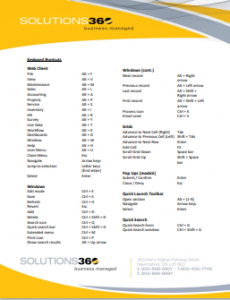
| Action | Shortcut | |
| Main Menu | File | Alt + F |
| View | Alt + V | |
| Maintenance | Alt + M | |
| Sales | Alt + L | |
| Accounting | Alt + A | |
| Projects | Alt + P | |
| Service | Alt + S | |
| Inventory | Alt + I | |
| HR | Alt + R | |
| Survey | Alt + Y | |
| Live Data | Alt + T | |
| Workflow | Alt + K | |
| Dashboards | Alt + D | |
| Window | Alt + W | |
| Help | Alt + H | |
| User Menu | Alt + U | |
| Close Menu | Esc | |
| Navigate | Arrow keys | |
| Jump to selection | Letter keys (first letter) | |
| Select | Enter | |
| Windows | Edit mode | Ctrl + E |
| Save | Ctrl + S | |
| Refresh | Ctrl + H | |
| Revert | Esc | |
| Add | Ctrl + D | |
| Delete | Ctrl + Shift + D | |
| Search icon | Ctrl + Q | |
| Quick search bar | Ctrl + Shift + G | |
| Extended menu | Ctrl + M | |
| Print icon | Ctrl + P | |
| Show search results | Alt + Up arrow | |
| Next record | Alt + Right arrow | |
| Previous record | Alt + Left arrow | |
| Last record | Alt + Shift + Right arrow | |
| First record | Alt + Shift + Left arrow | |
| Process icon | Ctrl + K | |
| Email send | Ctrl + S | |
| Date Field (empty) | Fill with today’s date | Ctrl + Enter |
| Grids | Advance to Next Cell (Right) | Tab |
| Advance to Previous Cell (Left) | Shift + Tab | |
| Advance to Next Row | Enter | |
| Edit Cell | F2 | |
| Scroll Grid Down | Space bar | |
| Scroll Grid Up | Shift + Space bar | |
| Pop Ups (modals) | Submit / Confirm | Enter |
| Close / Deny | Esc | |
| Quick Launch Toolbar | Open section | Alt + [1-9] |
| Navigate | Arrow keys | |
| Select | Enter | |
| Quick Search | Quick Search form | Ctrl + G |
| Quick Search window | Ctrl + Shift + G |